1. Route
1.1 why Route ?
PHP 프로젝트에서 우리는 /경로/php파일명을 URL 로 접근할 수 있습니다.
/aboutus/aboutus01.php
파일
/aboutus/aboutus01.php

브라우저 경로
http://url.com/aboutus/aboutus01.php
1) 복잡한 URL 을 간결하게 바꿀수 있다.
http://teddy.school.com/board/list.php?board_id=study&step=view&bid=23
=> http://teddy.school.com/board/study/23
2) 보안을 위해 직접 php 파일에 접근을 차단한다.
http://url.com/aboutus.blade.php ( x )
- php 프로젝트를 알수 있다. -> php 취약점 활용
- 경로를 알수 있다 -> 백도어등의 프로그램을 심어 자신이 심은 php 파일을 실행한다.
* Route 는 사용자의 URL 접근을 해석해서 Route 가 알고 있는 파일을 실행해준다.
1.2. Route 살펴보기
routes/web.php
use Illuminate\Support\Facades\Route;

Route::get('/', function () {
    return view('welcome');
});
view() 함수는 우리가 1강에서 이야기한 view 페이지를 보여주는 명령입니다.
1) 바로 Text 를 보내줄수도 있습니다.
Route::get('/aboutus', function () {
    return 'We are Hokma Teacher!';
});
2) 라우트에서 직접 로직을 만들고 결과를 리턴할 수도 있습니다.
Route::get('/addition', function () {
    $result = 2 + 3;
    return "The result of 2 + 3 is: " . $result;
});
3) Html 로 작성한 view 를 지정할 수 있습니다.
Route::get('/services', function () {
    return view('services');
});
* 여기서 잠깐 존재하지 않는 경로를 호출하면
없는 경로에 접근해보겠습니다.
http://127.0.0.1:8000/school
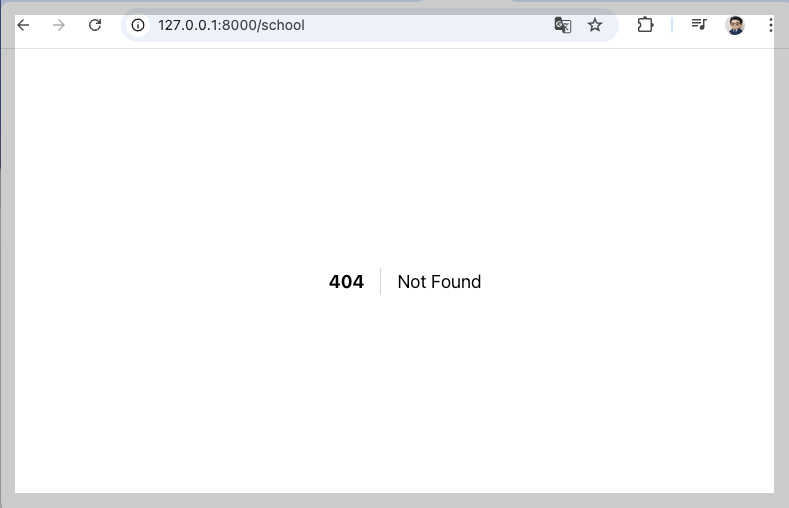
404 에러, 페이지가 존재하지 않다고 알려줍니다.
3) 리다이렉트
Route::get('/school', function () {
    return redirect('/service');
});
4) Controller 에게 처리를 지시하기
<?php
use Illuminate\Support\Facades\Route;
use App\Http\Controllers\LectureController;


# 컨트롤어와 function 을 지정해준다.
Route::get('/lectures', [LectureController::class, 'lectureIndex']);
# 컨트롤러를 사용할때는 web.php 상단에 LectureController 를 use 해 주어야 한다
# 컨트롤러의 자세한 내용은 다음시간에 공부하고 모양만 확인해보겠습니다.
app/Http/Controller/LectureController.php
<?php
namespace App\Http\Controllers;

class LectureController extends Controller
{
    public function lectureIndex()
    {
        return 'This is the lecture page.';
    }
}
5) 매개변수사용하기
Route::get('/article/{id}', function ($id) {
    return 'Article '.$id;
});
* 만약 id 없이 url 을 호출하면
404 를 보내줍니다.
* 선택적 매개변수
#id 가 있을수도, 없을수도 있습니다.
Route::get('/article/{id?}', function ($id=null) {
    return 'Article '.$id;
});
둘 이상의 매개변수를 사용할 수 있습니다.
Route::get('/article/{id}/comments/{commentId}', function ($id=null, $commentId=null) {
    return 'Article '.($id). ' - Comment '.($commentId);
});
5) 정규식 제약조건
Route::get('/program/{name}', function ($name) {
    return "Program's name " . $name;
})->where('name', '[A-Za-z]+');
http://127.0.0.1:8000/program/php
http://127.0.0.1:8000/program/php8
* 숫자도 허용하려면
Route::get('/program/{name}', function ($name) {
    return "Program's name " . $name;
})->where('name', '[A-Za-z0-9]+');
* 기타
Route::get('/user/{id}', function ($id) {
    //
})->where('id', '[0-9]+');

Route::get('/user/{id}/{name}', function ($id, $name) {
    //
})->where(['id' => '[0-9]+', 'name' => '[a-z]+']);


Route::get('/user/{id}/{name}', function ($id, $name) {
    //
})->whereNumber('id')->whereAlpha('name');

Route::get('/user/{name}', function ($name) {
    //
})->whereAlphaNumeric('name');

Route::get('/user/{id}', function ($id) {
    //
})->whereUuid('id');
## 매개변수를 사용할때
$url = route('profile',['id'=>1, 'name'=>'Teddy']);
우리는 Controller 를 통해 처리하는 방식을 주로 사용하게 될겁니다.
6) method
Route::get('/aboutus', function () {
    return 'We are Hokma Teacher!';
});
Route 에서 사용한 get 은 어떤 의미일까요?
Route::get('/signup', [UserController::class, 'signupForm'])->name("signup");
Route::post('/signup', [UserController::class, 'signup'])->name("signupok");
Route::post('/signupByOTP', [UserController::class, 'signupByOTP']);

Route::get('/register', [LoginController::class, 'registerForm'])->name('register');
Route::post('/register/confirm', [LoginController::class, 'registerConfirm'])->name('register.confirm');
네. route 에서는 get 방식으로 접근하는 경로, post 로만 접근하는 경로를 지정할 수있습니다.
* /signup get, post 접근 가능여부를 직접 진행해볼것.
2026.04.15
Route::get('/user/profile/{id}', function ($id) {
    return "$id Profile Page";
})->name('profile');
7) naming
Route::get('/user/profile/{id}', function ($id) {
    return "$id Profile Page";
})->name('profile');
## 컨트롤러등에서 URL 등을 대체해준다.
$url = route('profile');
return "User Index Page. Profile URL: " . $url;
오늘 부터 운송플랫폼을 기준으로 설명하도록 하겠습니다.
8) prepix
먼저 shipment 기능의 라우트를 작성해보겠습니다.
// post 라우트
Route::get('/shipment', [ShipmentController::class, 'index']);
Route::get('/shipment/form', [ShipmentController::class, 'form']);
Route::post('/shipment/update', [ShipmentController::class, 'update']);
Route::post('/shipment/delete', [ShipmentController::class, 'delete']);
각 URL 을 브라우저로 확인해봅니다.
공통된 경로를 하나로 묶어 그룹화하여 간결하고 체계적으로 관리할수 있게 해줍니다.
//  Prefix 를 이용함

Route::prefix('shipment')->name('shipment.')->group(function () {

    // post 라우트
    Route::get('/', [ShipmentController::class, 'index']);
    Route::get('/form', [ShipmentController::class, 'form']);
    Route::post('/update', [ShipmentController::class, 'update']);
    Route::post('/delete', [ShipmentController::class, 'delete']);

});
컨트롤러를 그룹화할 수도 있습니다. ( 저는 실무에서 사용해본적이 없는데 이런것도 있네요 )
# Route::post('shipment/items', [ShopController::class, 'index']);


Route::prefix('shipment')->controller(ShipmentController::class)->group(function () {
    Route::get('/items', 'index');   // /shop/items
    Route::get('/item/{id}', 'show'); // /shop/item/{id}
});
** 라우트에 대한 질문이 있으신가요?
'Hokma School :: Course 2 Laravel' 카테고리의 다른 글
| Laravel 07. Form / Validation + git clone laravel project (0) | 2026.04.28 |
|---|---|
| Laravel 06. Eloquent ORM (0) | 2026.04.24 |
| Laravel 04. Blade Templete (0) | 2026.04.13 |
| Laravel 03. Controller (0) | 2026.04.13 |
| Laravel 01. 라라벨 소개와 설치 (0) | 2026.04.08 |